[Part 1] - Build & Publish React component as NPM package using Typescript compiler
![[Part 1] - Build & Publish React component as NPM package using Typescript compiler](https://cdn.hashnode.com/res/hashnode/image/upload/v1680502323468/b83337d6-0fd5-4d4e-90a1-5176f094293d.png)
Frontend Developer at Thoughtworks
I was too lazy to include webpack to bundle the react component as it needs a lot of boilerplate configuration code. so easiest way was to build the react typescript project using the typescript compiler with a little help from tsc-hooks.
you can follow the steps to know more about building and publishing a react project without the use of webpack.
Let's first initialise the project.
mkdir toggle-button

yarn init
or
npm init
Add the following packages as dev dependencies-
yarn add -D react react-dom @types/react @types/react-dom typescript tsc-hooks
or
npm install --save-dev react react-dom @types/react @types/react-dom typescript tsc-hooks
Update react as peer dependency so that the user of this package will be prompted to install react while adding this package.
now the package.json should look like -
package.json
{
  "name": "react-toggle-button",
  "version": "0.0.1",
  "description": "React toggle button",
  "main": "dist/", // update this
  "scripts": {
    "test": "yarn test",
    "build": "tsc" // runs tsc compiler to build the project in dist directory (configured in tsconfig.json)
  },
  "repository": {
    "type": "git",
    "url": "git+https://github.com/YOUR-REPO/react-toggle-button.git"
  },
  "keywords": [
    "react",
    "react-toggle-button"
  ],
  "author": "AUTHOR NAME",
  "license": "ISC",
  "bugs": {
    "url": "https://github.com/YOUR-REPO/react-toggle-button/issues"
  },
  "homepage": "https://github.com/YOUR-REPO/react-toggle-button#readme",
  "devDependencies": {
    "@types/react": "^18.0.18",
    "react": "^18.2.0",
    "tsc-hooks": "^1.1.1", // needed to copy css files in the final build
    "typescript": "^4.8.3"
  },
  "peerDependencies": {
     "react": "^18.2.0" // add react as a peer dependency
  },
  "files": [
    "/dist" // tells the bundler to only add dist folder while publishing the package. package.json will be automatically added.
  ]
}
Add tsconfig.json
now let's add tsconfig.json for the typescript compiler to know where and how to build the typescript files.
tsconfig.json
{
    "compilerOptions": {
        "target": "ES2015",
        "jsx": "react",
        "module": "esnext",
        "moduleResolution": "node",
        "allowJs": true,
        "declaration": true, // required to generate corresponding *.d.ts files
        "outDir": "./dist",
        "esModuleInterop": true,
        "strict": true,
        "noImplicitAny": true,
    },
    "exclude": [
        "node_modules",
    ],
    "hooks": [
        "copy-files" // copies all files to the dist folder
    ],
    "include": [
        "src/",
        "src/**/*.module.css" // include css files while building the project using tsc
    ]
}
if you want to avoid copying all files to the final build then another workaround is to use a package copyfiles and add a script in package.json to manually copy selective files. For eg. In this case we are copying all css files.
package.json
...
 "copy-files": "copyfiles -u 1 src/**/*.css dist/",
...
Add .npmignore
Add .npmignore to exclude src files from the final npm package build.
.npmignore
/src
Now lets add the react component in the src directory
src/ToggleButton/ToggleButton.tsx
import React from "react";
import styles from "./ToggleButton.module.css";
interface ToggleButtonProps {
  onClick: () => void;
  value: boolean;
}
const ToggleButton = ({ onClick, value }: ToggleButtonProps) => {
  function clickHandler() {
    onClick();
  }
  return (
    <div
      id={value ? "on" : "off"}
      className={styles.toggleButton}
      onClick={clickHandler}
    >
      <div className={styles.bar}>
        <div className={styles.circle}></div>
      </div>
    </div>
  );
};

export default ToggleButton;
src/ToggleButton/ToggleButton.module.css
.toggleButton {
  position: relative;
  width: 36px;
  height: 1rem;
  display: flex;
  align-items: center;
}
.circle {
  width: 17px;
  height: 17px;
  border-radius: 50%;
  position: absolute;
  top: 50%;
  transform: translateY(-50%);
  transition: all 0.3s ease-in;
  --on : #eb5757;
  --off: #e0e0e0;
}
.bar {
  height: 20px;
  width: 100%;
  border-radius: 50px;
  padding: 2px;
}
#on .bar {
  background-color: var(--on);
}
#off .bar {
  background-color: var(--off);
}
#on .circle {
  background-color: var(--on);
  left: calc(100% - 19px);
}
#off .circle {
  background-color: var(--off);
  left: 2px;
}
Add declarations.d.ts
Add declarations.d.ts file so that typescript compliler know about the *.module.css files.
src/declarations.d.ts
declare module '*.module.css' {
  const classes: { [key: string]: string };
  export default classes;
}
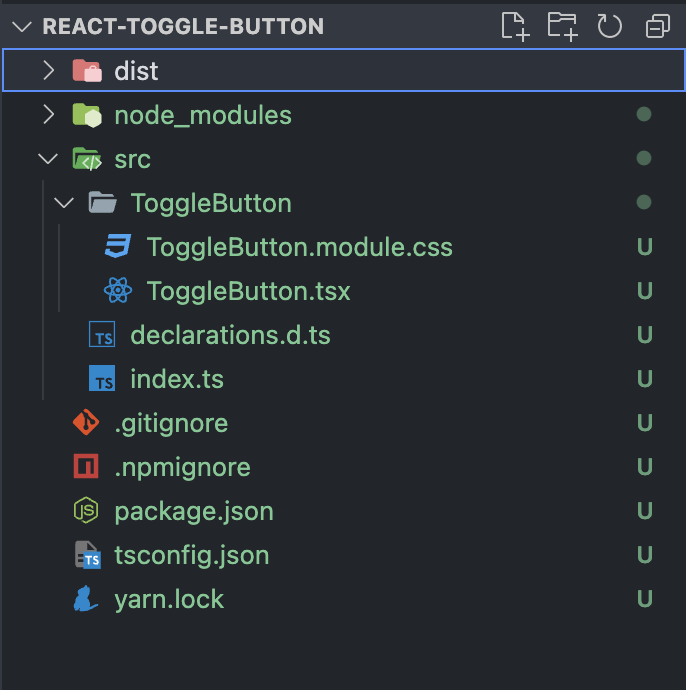
Directory structure should look like -
Add Readme file
Don't forget to add a README.md file in the root directory with all the installation and usage of the package you are deploying. I am skipping this step in the example.
Build package & Publish
Lets run tsc compiler to generate the respective files in dist directory -
yarn build // spits the output files in the dist/ directory
now we are ready to publish the package. If you are deploying for the first time - create an npm account and login in the terminal.
npm login // skip this if you are already logged in
npm publish
Update the package version before every publish otherwise the publish will fail.